
SuperLive- Live Stream & Chat
Superlive TechSocial
4.45.83K Reviews
- Version
- 2.50.0
- Installs
- 10.00M
- Age Rating
- Mature 17+
Screenshots



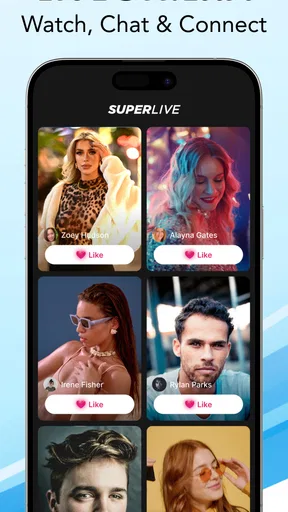
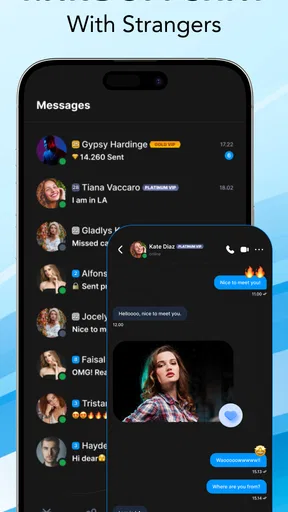

Our Review of SuperLive- Live Stream & Chat
 Analysis by Appyee
I spent time with SuperLive as a social video-streaming app, and my first impression was that it is built for people who prefer live interaction over carefully edited posts. You open it expecting movement, conversation, and a steady flow of broadcasts rather than a quiet feed of finished clips. That makes it appealing when I want to discover personalities in the moment, but it also means the experience depends more heavily on connection quality, the activity of individual broadcasters, and how comfortable I am with a fast-moving social environment.
The app is developed by Superlive Tech and is free to download. It has reached over ten million installs and holds a 4.5 average from around 242,000 ratings, which suggests that the basic live-social concept has found a substantial audience. Its mature 17+ rating is important, though: I would not treat it as a casual app for younger family members. Live communities can change quickly, and the age guidance should be part of the decision before installing it.
How SuperLive feels during ordinary use
The central appeal is immediacy. Instead of waiting for someone to publish a polished update, I can enter a live room and see what is happening at that moment. That creates a different kind of attention from ordinary social networks. A short visit can turn into a longer session because each broadcast feels like an open door rather than a finished item that I simply scroll past.
In practical terms, I find the app best suited to three kinds of users. The first is someone who enjoys chatting with creators or hosts while events are happening. The second is a person who likes browsing unfamiliar live communities and discovering presenters without needing a recommendation from friends. The third is a user who wants a more direct social atmosphere than photo feeds usually provide.
It is less suitable for someone who wants a calm, private, highly filtered experience. It is also not my first choice for people who mainly want on-demand entertainment, because live streaming asks me to accept that the timing, quality, and tone of a session are not fully under my control. If my goal is to watch a specific film, follow a structured course, or consume short videos with predictable pacing, a conventional video platform is usually a better fit.
Speed expectations depend on the live format
SuperLive generally feels most responsive when I treat it as a browsing-and-chat app rather than a demanding production tool. Moving between live content and deciding which room to enter is naturally quicker than loading a long, edited video library. The real test begins once a broadcast is playing, because live video has to maintain a continuous connection instead of loading only small pieces of content at a time.
I would not judge the app’s speed solely by how quickly its first screen appears. Live video can look smooth at one moment and become less comfortable when the network changes, the room becomes busy, or I switch repeatedly between broadcasts. That is a normal trade-off of the format, but it matters if I am using mobile data or a device that is already working hard in the background.
One useful habit is to give a broadcast a few moments before deciding that it is slow. A brief pause during the transition may be connection-related rather than a permanent problem with the app. Conversely, if several rooms behave poorly in succession, I would check the connection and close other demanding apps before assuming that the service itself is failing.
What happens during longer or heavier sessions
The heaviest use case is not a quick glance at one stream. It is staying in live rooms for a long period, switching between broadcasts, reading a busy chat, and possibly interacting repeatedly. That combination keeps the screen active and asks the phone to process continuous video while also handling social updates. On an older phone, the difference between a short visit and an extended session can be noticeable even when both begin smoothly.
I recommend approaching long sessions with a simple routine. Start with a charged device, avoid running several video-heavy apps at the same time, and keep an eye on heat rather than waiting for the phone to become uncomfortable. If the handset warms up, lowering the intensity of the session by leaving unused apps closed and taking a break is more sensible than forcing it to continue indefinitely.
This is also where the app’s social design can encourage unplanned spending. Live environments make interaction feel immediate, and in-app purchases range from $0.99 to $399.99 per item. I would decide on a personal limit before entering a long session, especially if gifts or other paid interactions become part of the experience. The free download makes trying the app easy, but “free” does not mean every part of the social experience is cost-free.
My most practical tip is to separate discovery from spending. I can browse rooms, decide which creators I genuinely enjoy, and only then consider whether a paid interaction is worthwhile. That small pause reduces the chance of making a purchase simply because a live moment feels exciting. It also helps me evaluate the content on its own rather than treating payment as the price of belonging in a room.
Stability, interruptions, and recovering a session
Live apps have a different reliability challenge from ordinary social feeds. If a static post takes a moment to appear, I can read something else while waiting. If a live stream interrupts, the social moment itself may be lost. For that reason, I pay attention not only to whether SuperLive opens, but also to how gracefully it handles a weak connection, a switch away from the app, or a return after an interruption.
My recovery approach is straightforward: first wait briefly, then try leaving the room and re-entering it rather than repeatedly tapping the same control. If the entire app feels unresponsive, restarting it is more useful than continuing to fight the screen. I also make sure the operating system is supported, since the app requires Android 8.0 or later. That requirement covers many devices, but it still rules out older phones that may otherwise handle basic social applications.
A reliable live experience is partly outside the app’s control. Wi-Fi congestion, mobile signal changes, and a broadcaster’s own setup can all affect what I see. This is why I would avoid judging SuperLive from one troubled broadcast. At the same time, repeated interruptions across different rooms would be a fair reason to reconsider whether it fits my connection and device.
Another recovery issue is social rather than technical. If I leave a room because the conversation becomes uncomfortable, I should not feel obliged to return just because I was already participating. The mature rating reinforces that this is an environment where personal boundaries matter. I find the app more enjoyable when I use the exit option freely and choose rooms based on the tone I actually want, not on pressure to remain visible or engaged.
Device limits and the Android version requirement
SuperLive supports Android 8.0 and newer, with version 2.39.1 listed as the current version. That gives the app a reasonably broad starting point, but compatibility alone does not guarantee an equally pleasant experience on every phone. A newer handset with a strong connection is likely to feel more comfortable during extended live viewing than an older model with limited memory, a tired battery, or a crowded storage situation.
I would be especially cautious on entry-level hardware. Live video and active chat can be more demanding than reading text or browsing still images, and a budget phone may show its limits through heat, battery drain, or slower recovery after switching apps. I would not install it expecting the same experience on every Android device simply because the operating system meets the minimum requirement.
There is also a practical privacy and environment consideration when using the app in public. Live streams are easy to start casually, but sound can be distracting, and the mature rating means the surrounding content may not match every setting. Headphones can make a short visit more discreet, while a quieter private space is better if I plan to participate rather than merely watch.
For iPhone users, the main buying decision is less about the minimum Android requirement and more about whether live social interaction is the right format. I would choose it for real-time communities, not because I expect it to replace every social app. People who prefer direct messages, curated friend updates, or edited short-form video may find their usual alternatives more predictable and less demanding.
How it compares with familiar social alternatives
Compared with a standard social network, SuperLive puts the present moment first. Traditional feeds are easier to skim at my own pace, and they usually let me return to content whenever I want. Here, the attraction is that the broadcaster and audience are sharing a live window. That can feel more personal, but it also makes the quality of a visit more dependent on who is online and how the room is managed.
Compared with an on-demand video service, the app offers less control over timing and selection. I cannot expect every session to have the polish, structure, or predictable length of a prepared video. In return, I get the possibility of spontaneous conversation. For me, that exchange is worthwhile when I want company or participation, but not when I am trying to relax with a specific piece of content.
Compared with a messaging app, the audience can feel broader and the discovery process more open. Messaging is better for private conversations with people I already know. SuperLive is more interesting when I want to observe or join a public-facing live community, though that openness also requires more judgment about which rooms deserve my time.
Small habits that make the experience better
I get more from the app when I avoid treating the home screen as a command to watch the first available broadcast. I browse deliberately, give myself a time limit, and leave rooms that do not match my interests. This prevents the endless-session effect that live platforms can create, where each new room feels like a reason to stay for another few minutes.
I also prefer to evaluate a creator across more than one visit before spending money or becoming heavily involved in a community. A single energetic session may not represent the usual tone of that room. Returning later helps me see whether the interaction is consistently respectful and whether the content actually suits me.
For users who plan to broadcast rather than only watch, I would think about the phone’s battery, temperature, and connection before going live. A short test session is more sensible than assuming that a device comfortable with ordinary browsing will remain comfortable during continuous video. I would also prepare a clear stopping point, because live interaction can make it easy to continue longer than intended.
Finally, I would keep purchases intentional. The wide in-app purchase range means a small experiment and a very large transaction are both possible within the same ecosystem. Setting a device-level spending safeguard, where available, and never purchasing while distracted are sensible precautions. The app’s social energy is a strength, but it can also make impulsive decisions feel more natural than they should.
Who should install it, and who should skip it?
I would recommend SuperLive to adults who genuinely enjoy live conversation, spontaneous discovery, and the feeling of entering an active room rather than consuming finished media. It is especially appealing if I want to watch personalities in real time and occasionally participate in the atmosphere. The large user base and strong average rating indicate that this style of social video has broad appeal, although popularity does not guarantee that every room will suit every person.
I would skip it if I am looking for a quiet, tightly controlled experience, if my phone struggles with continuous video, or if my internet connection is unreliable. I would also choose another app if my main purpose is private messaging, edited entertainment, or content that I can pause and resume without missing a live moment.
The mature 17+ rating should be taken seriously, not treated as a minor label. Parents choosing apps for younger users should look for an age-appropriate alternative instead. Adults should still use judgment about rooms, conversations, and spending, particularly when a broadcast feels unusually persuasive or emotionally intense.
My performance verdict
SuperLive succeeds because it makes social video feel immediate. In my experience, its strongest quality is not technical spectacle but the simple change from watching finished posts to joining something that is happening now. That makes it more engaging than a conventional feed when I want interaction, while also making it less predictable and potentially more demanding on the phone.
The app is free to install, but the combination of mature live communities and in-app purchases means I would use it with clear boundaries. I would keep sessions purposeful, monitor device comfort during heavy viewing, and treat connection interruptions as part of the live format rather than expecting every room to behave like an on-demand video.
My overall recommendation is positive for adults who want real-time social video, but conditional for everyone else. If you have a supported Android device, a dependable connection, and an interest in live communities, it is worth trying. If you value control, privacy, low resource use, or completely predictable content, your usual social, messaging, or video alternatives will probably serve you better.
After using it, I see SuperLive as a focused social choice rather than an all-purpose replacement for every platform. Its best moments come from finding the right room at the right time. Its main weaknesses appear when the connection, device, spending habits, or community atmosphere are not working in your favor. Used selectively, it can be an enjoyable way to meet live audiences and follow broadcasts; used without limits, it can become demanding, distracting, and more expensive than the free download initially suggests.
Privacy and Permissions
See what permissions an app requests and how it handles your data.
- Location
- approximate location (network-based), precise location (GPS and network-based)
- Phone
- read phone status and identity
- Photos/Media/Files
- read the contents of your USB storage, modify or delete the contents of your USB storage
- Storage
- read the contents of your USB storage, modify or delete the contents of your USB storage
- Camera
- take pictures and videos
- Microphone
- record audio
- Wi-Fi connection information
- view Wi-Fi connections
- Device ID & call information
- read phone status and identity
- Other
- view network connections, pair with Bluetooth devices, full network access, change your audio settings, run at startup, prevent device from sleeping, read Google service configuration
Verdict
Strengths of SuperLive- Live Stream & Chat
- Supports live video streaming and real-time viewer interaction.
- Chat features make it easy to connect with creators and audiences.
- Offers a wide range of live content across different interests.
- Users can follow favorite streamers and receive activity updates.
- Simple interface makes browsing live broadcasts relatively convenient.
Limitations of SuperLive- Live Stream & Chat
- Content quality varies significantly between different streamers.
- Some broadcasts may include mature or unsuitable material.
- In-app purchases can affect access to certain virtual features.
- Live chat may contain spam, promotional posts, or unwanted messages.
- Requires a stable internet connection for smooth video playback.
Similar Picks in This Category
View All
Meta Platforms, Inc.4.6

Instagram4.0

Likee-Live, Chat & Party Games
Likeme Pte. Ltd.4.4

Facebook Lite
Meta Platforms, Inc.4.5

TikTok - Videos, Shop & LIVE
TikTok Pte. Ltd.4.0

Moj: Free Short Drama & Reels
ShareChat4.1
Frequently Asked Questions
What is SuperLive – Live Stream & Chat, and what can I do with it?
SuperLive is a social live-streaming app where users can watch real-time broadcasts, chat with streamers, follow creators, and interact through comments or virtual gifts. Depending on the region and available features, you may also be able to start your own live stream, meet people with similar interests, and participate in audio or video conversations. The experience is centered on entertainment and direct audience interaction.
Is SuperLive – Live Stream & Chat free to download and use?
The app can generally be downloaded for free, and many streams and social features are available without paying. However, SuperLive may include optional in-app purchases, such as virtual coins, gifts, subscriptions, or other premium items. These purchases can support streamers or unlock additional interactions. Check the current pricing shown in the app and review your device’s purchase settings before spending money.
Do I need to create an account to watch live streams on SuperLive?
You may be able to browse or watch some content without completing a full registration, but an account is usually required for interactive features. Signing in can allow you to follow streamers, send messages, give virtual gifts, save preferences, and access personalized recommendations. Registration options may vary by device and country, so the exact process can differ after installation.
Is SuperLive safe for children and teenagers?
SuperLive is designed around live, user-generated content, so broadcasts and chats can change quickly and may not always be suitable for younger viewers. Some interactions may involve mature language, suggestive behavior, or contact from strangers. Parents should review the app’s age rating, privacy settings, blocking and reporting tools, and in-app purchase controls. Younger users should use the service only with appropriate supervision.
What permissions and internet connection does SuperLive require?
SuperLive needs a stable internet connection to load live video, send messages, and maintain real-time interactions. If you decide to broadcast, the app may request access to your camera and microphone, while notifications may be used to alert you about followed creators or messages. You can manage permissions through Android or iOS settings. Streaming video can also consume significant mobile data and battery.
